
Pickup & delivery orders that belong to the freight file
The first mile and the last mile of every file, documented like the freight in between: orders generated from the shipment, proof captured at the door, customer informed without a phone call.
The short answer: Pickup and delivery management in Linbis is part of the freight file, not a separate app: pickup orders created from the shipment or warehouse receipt they serve, delivery orders that close the import, paperwork among the platform’s 96 document layouts, signature-and-photo proof of delivery on the release, and status-flow emails that keep the customer informed automatically.
Orders that come from the file, not a second system
A pickup order in Linbis is born from the record it serves — the shipment, the shipping order, the warehouse receipt — with parties, cargo, and references already on it. The paperwork prints from the same data. When cargo arrives at the warehouse, receiving checks it against what the order promised.
Delivery orders close the loop on imports: same file, same references, same customer visibility — the last mile documented like the ten thousand before it.
Proof of delivery that ends arguments
The release captures a signature and photos at the door and attaches them to the record permanently. When a consignee calls three weeks later, the answer is on the file — who signed, what it looked like, when. Charges for the move travel the normal road to the invoice.
The customer hears from you automatically
Configurable status flows email the customer with the right paperwork attached as the move progresses — pickup confirmed, cargo received, out for delivery, delivered. Each stage can require fields or documents before the file may enter it, so "delivered" always means documented. The AI layer reads the replies and paperwork coming back.
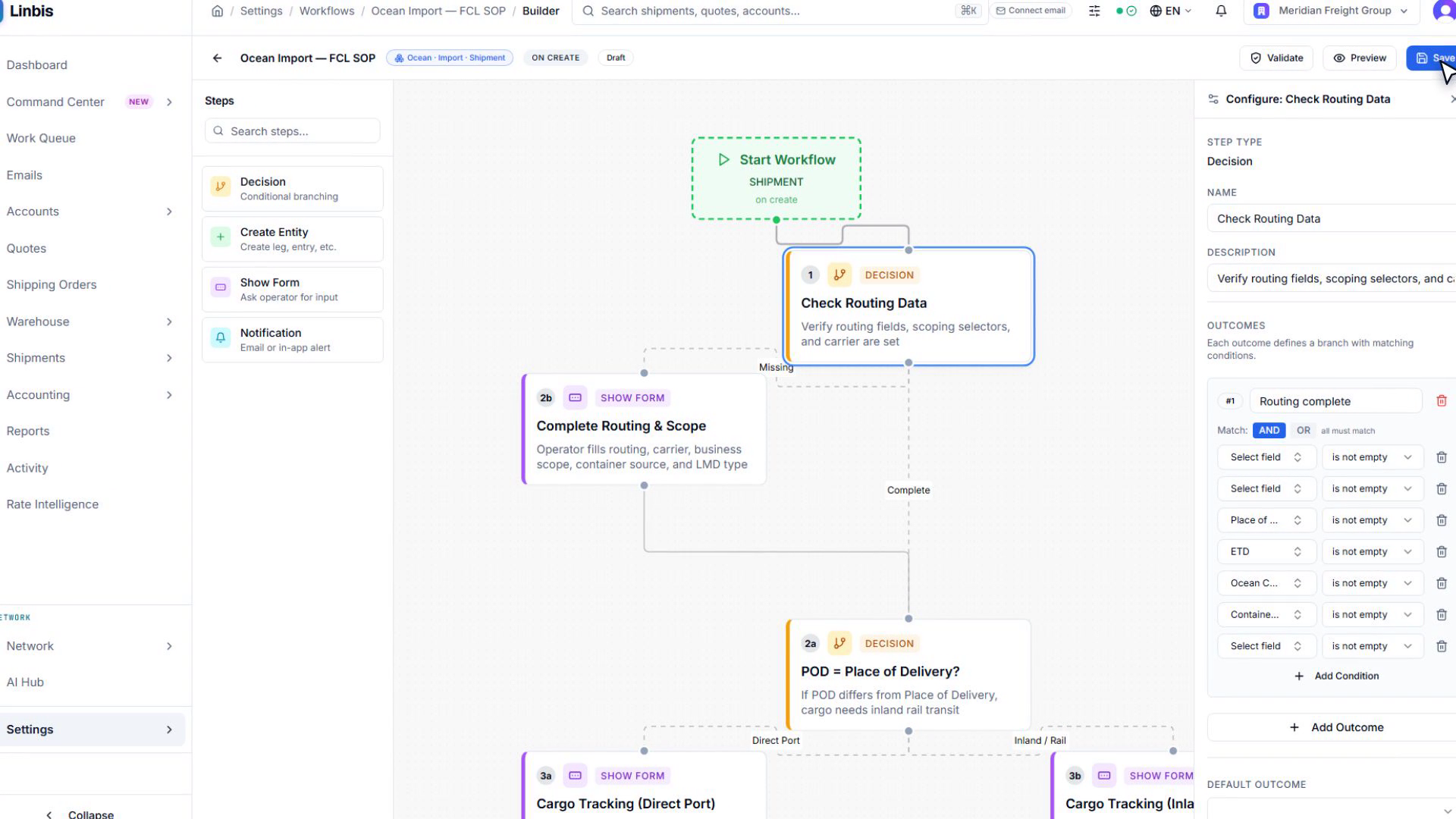
Watch: the SOP as a flowchart
Pickup, receiving, and delivery steps drawn as a visual procedure the whole team can see and follow.
Video transcript
Your operating procedure, drawn as a flowchart — decisions, branches, and automations the whole team can see and follow.
Frequently asked questions
Is this a courier dispatch app?
No — see our honest comparison on the courier software page. This is pickup and delivery as part of the freight file: orders from the record, POD on the release, customer notified by the status flow.
Can drivers capture proof of delivery?
Yes — signature and photos captured on the release and attached to the record permanently.
Do customers get notified automatically?
Yes — status-flow emails send automatically (or wait for one-click approval, your choice per stage) with the right documents attached.
Does a pickup connect to the warehouse?
Directly — the pickup order feeds the warehouse receipt, receiving checks cargo against it, and the received cargo rolls into the consolidation on the same platform.
First mile to last, one record
Orders from the file, proof at the door, the customer already informed.
Start Free TrialThe screens and clips on this page are the real Linbis product recorded on a demonstration company; workflows shown are production features.